
UX CASE STUDY
Study App – Group project
It’s difficult to arrange study with fellow students. What if there was an app to help with this?
This was a group project, produced with my teammate, a fellow Coursera (E-learning) User Interface Course student, living in Cairo. We were mainly messaged with Slack and worked together on all stages of the project.

Background
College students often study together, which has many benefits, including increasing their motivation to study, setting time aside, and mutual learning. We were looking for a way to help students to arrange group study. Firstly by discovering the pain points they experience in getting together for group study, then find a solution to these with our system design.

Competition in the market
There are many study apps around, some of these are for student planning. They centre mostly around planning for assignments or approaching exams, rather than organising the study itself. Google Calendar can send event invitations but does not have study specific information. (Other than its school specific application.) Facebook and WhatsApp don’t have a calendar view, they rely on the user switching between apps.
User Research
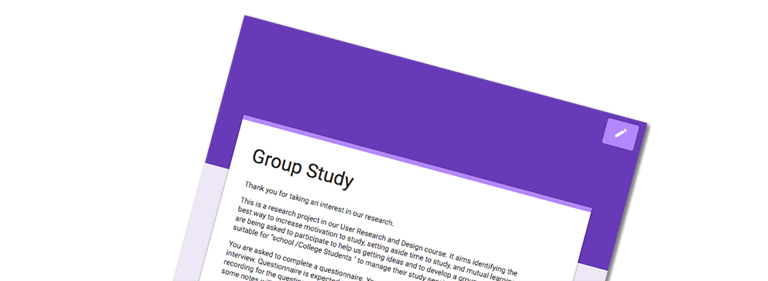
Our research of interviews and questionnaires was with students who were studying professional part-time or full-time. The participants were from both the UK and Egypt. We recruited participants for the questionnaire through social media and sending the questionnaire to colleagues. Interviews were also with colleagues, partly recruited through the questionnaire and also family members who are currently studying.
With interviews we investigated;
1 . Their experience of technology and any studying applications.
Findings: We found all the participants prefer to use mobile phones to communicate with their friends. Most of them use Facebook, WhatsApp and YouTube for different studying purposes. Over half had tried no special study applications that help them manage their tasks.
2. If they would like to study with others and if so their main objective and motivation for studying in a group.
Findings: Over half the participants prefer to study alone so that they can concentrate much better. Most of our participants tried to schedule their tasks before starting their study.
3. Any Pain points while studying in groups, or preventing them from group study.
Findings: Finding a time.
Both the interviews and questionnaires showed that finding an agreed time was the biggest barrier, planning came second.
The questionnaires sought to answer if the following are true:
Q: Finding a location for the session is a barrier to group study
A: Of those who do not group study, they did not find the location a barrier. Of those who do group study, less than one-third of respondents cited the location of the session as something to overcome.
Q: There are common demographics in those who currently study in a group
A: Yes, 16-year-olds in compulsory education.
Finding an agreed time is a barrier to group study
Further findings: When planning the sessions, students plan the time, location, and content of the session as one set of communication. They most commonly use Social Media, one example was Facebook and messaging from mobile devices, including WhatsApp and SMS. Respondents were not aware of the study apps which we listed in the questionnaire.
The people who cited cultural barriers were the same people who group study, are in full-time compulsory education, aged 11-16 as well as a part-time student aged 30-39. This is therefore an issue that transcends all groups, including those who group study.
We submitted for grading a report which contained figures and quotes from our research.
Design Requirements
Design requirements
From the research we set out to design a system that enables:
1. A group to schedule and agree on a time for group study (around other commitments such as a course timetable and/or employment)
2. A group to plan content for the group study session
3. A group to plan a session schedule
4. Individuals to find motivation for study by target setting, tracking their progress, and marking achieved targets. Targets include: having a successful study session and completion of tasks 1-3
Although some participants felt reluctant to group study, research has shown that it can be beneficial. If the user is interested in the benefits, we aimed to provide an aid to motivation for group study. In the same way a fitness app might to those who say they do not wish to exercise.
Ideas
Ideation
Together we came up with 100 ideas – I covered a table in post-it notes. We removed duplications and then sifted these to find five top ideas, grading them against the design requirements.
First prototype
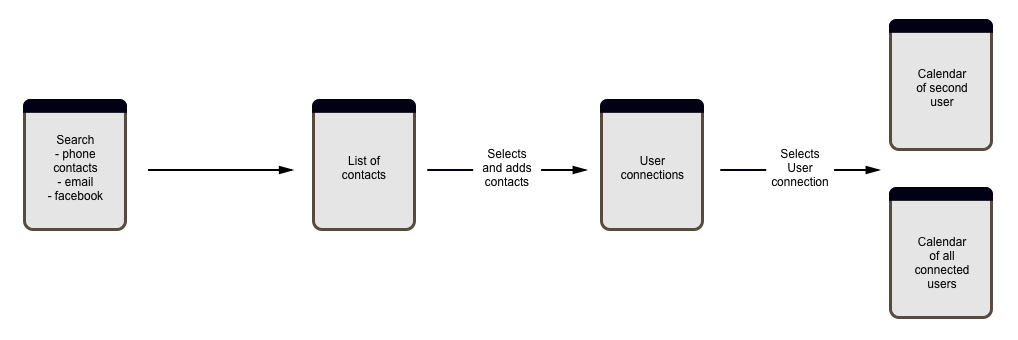
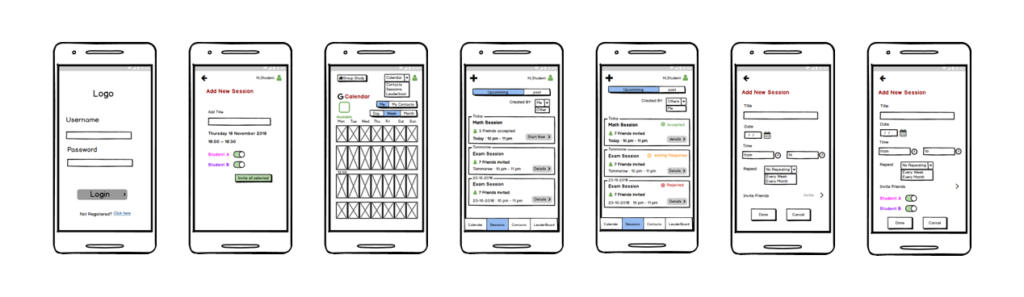
From the selected idea, we mapped out how tasks could be completed using text wireflows in Excel (as we were working remotely). These formed a basis to work from for our first prototype. We built this in Balsamiq Mockups. I had used Sketch before but found Balsamiq very intuitive to use.
Cognitive scenario
Our Heuristic reports, also without users, gave us a list of items to address in the next stage of the design. We used Neilson’s Heuristics, and each graded our findings with severity scores, to express how critical the fixes were needed. We averaged these scores, which gave us a list of priorities in creating the next prototype.
Second prototype
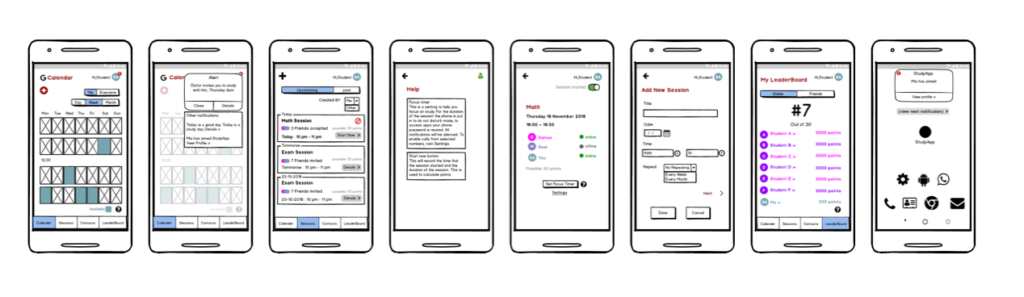
Our project was making good progress as we put together the second prototype, incorporating our list of issues to address following the last two tests. I put together the second Mock-up, also in Balsamiq and my teammate made a video of the tasks being completed with it. We then planned for real user tests by creating a user test pack of all documents, in one pdf.
• consent
• participant orientation
• exploration and task instructions
• prompts for researchers
• plan from orientation to thanking
Conclusion
What didn’t work well:
- Dots, squares and numbers didn’t work well through the testing, there is a lot of confusion about it. Although some users came to the correct conclusion before/during the second task; it would be better for them to not have to work it out.
- Inviting friends also should be clear to the user, they were confused between an invitation for a study session and an invitation to use the app
- Need better feedback from creating the session, rather than just adding the contacts.
- Users wanted a ‘select all’ button on the contacts screen.
What did work well:
- Adding ‘description’ box allows the user to add content information or subtasks to study
- Including notifications for users after their friend accepts an invitation; or for invitations to the app
- Leaderboard worked smoothly and helped motivation
- Help screens which acted as a guide
- Adding the focus timer was a welcomed addition after the walkthroughs
- The functionality to make a past session reoccurring was discovered quickly, remembered and used.
The research was challenging, there should have been more researchers, but as are living on different continents we did the user research separately. Therefore, we needed to record quickly and observe as much as possible. We could not record audio, this would be helpful for the future.
Next steps
From the user research we have these areas to improve on:
- Changing dots, numbers and squares to something easier for the user to understand in the Calendar screens, minimising the need for explanation
- Adding onboarding screens; i. to demonstrate the leaderboard before starting exploring the app for the first time user ii. to explain how the calendar works
- Adding a search field to help find friends from phone contacts
- Adding a select all option for inviting friends
- Further investigation into the design of the ‘+’ button for adding time to the calendar
- Add feedback following the creation of a session